Punch list template (snag list): free Excel and PDF download
Deskely Completions team Singapore
A punch list (a snag list in UK building work) records every item that is incomplete, damaged or not to specification before a system can move to its next milestone. This page gives you a free punch list template in Excel, a printable walkdown form, and the practice behind them: the fields every item needs, the A, B and C categories, and how an item is raised, cleared and closed.
It uses the fields completions teams work with on industrial, offshore and building projects. Download it, change it to suit your procedure, and use it freely.
- Raise one item per defect, at a tag, with a photo and a clear description.
- Categorise every item A, B or C. A items block the next milestone.
- An item is closed only when someone other than the person who fixed it has verified it.
- Count open items per subsystem: that is what decides whether a certificate can be signed.
What is in the template
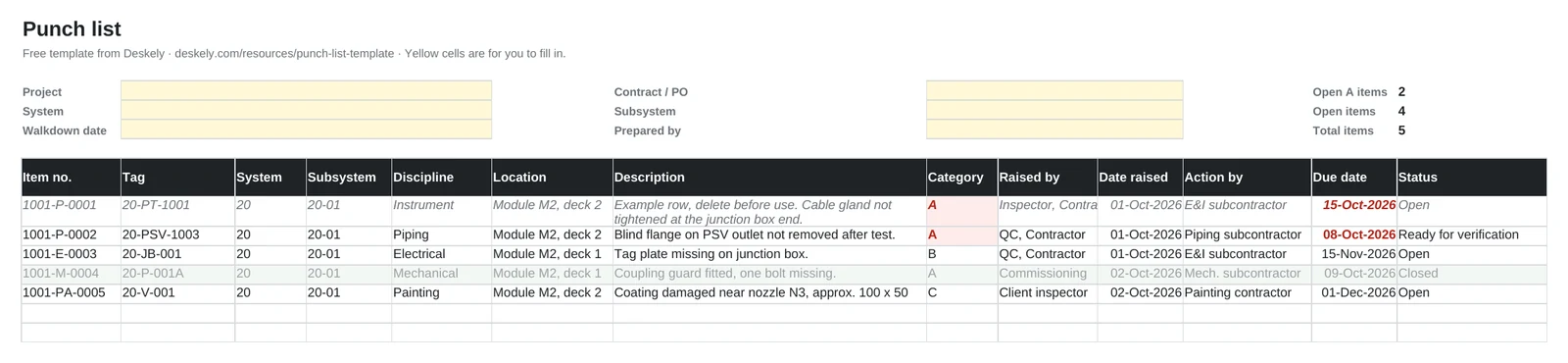
- Punch list sheet: one row per item, with drop-downs for category, discipline and status, a header for project, system and subsystem, and filters on every column.
- Colour coding: open A items show in red, overdue due dates in bold red, and closed items turn grey.
- Days open: calculated for every item, so ageing items stand out.
- Summary sheet: open, ready for verification, closed and rejected items by category, and open items by discipline. It updates by itself.
- How to use sheet: the category definitions, every column explained, and the status flow.
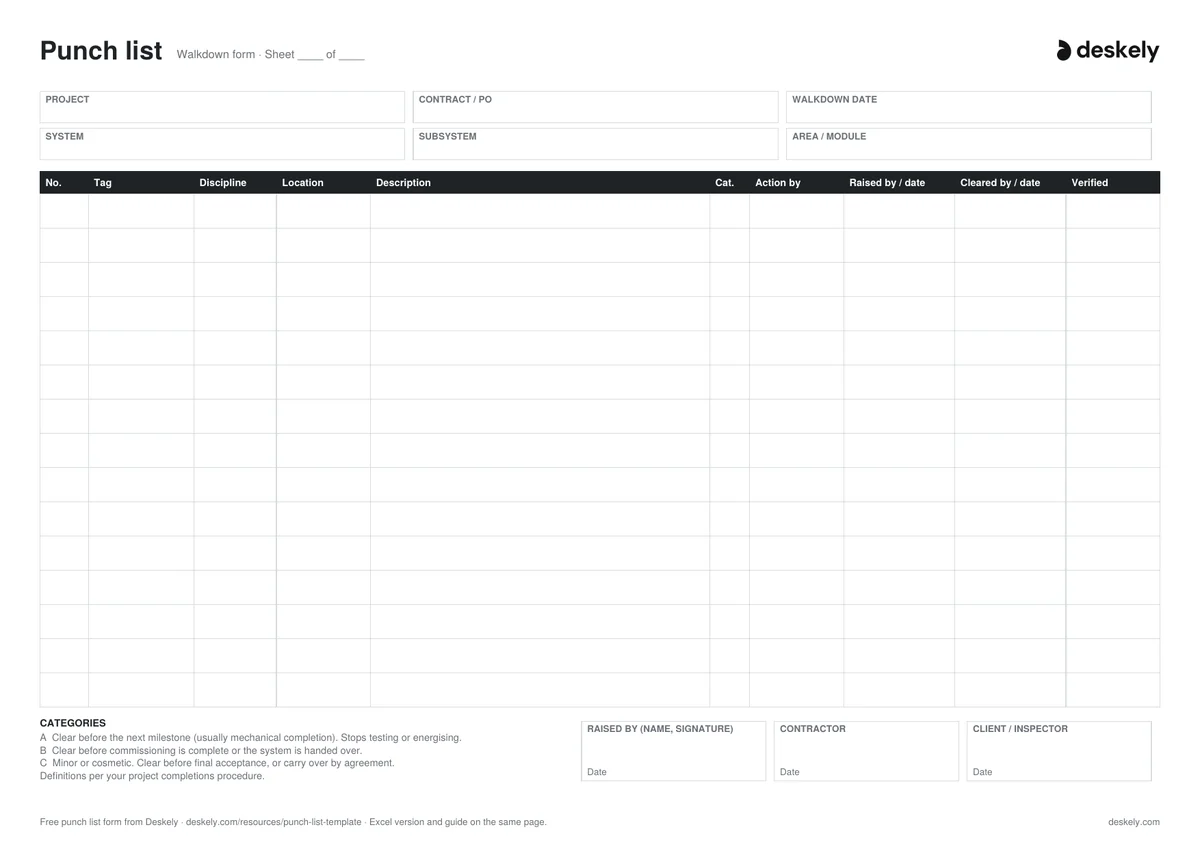
- Printable form (PDF): for walkdowns where a tablet is not practical. Write the items up in the Excel sheet afterwards.
The drop-down values sit on a Lists sheet, so you can change the disciplines and statuses to match your project procedure.
What is a punch list?
A punch list (called a snag list in UK building work) is the list of work that is incomplete or not to specification, found during inspections and walkdowns. Each item is raised against a piece of equipment, a line or a cable, given a category, assigned to the party who will fix it, and closed once the fix has been checked.
In building construction the punch list is often a single walk before handover. On industrial and offshore projects it runs from the first construction inspection to the last certificate, and it is counted per system. That is why a good template ties every item to a tag and a subsystem.
The fields every punch item needs
| Field | Why it matters |
|---|---|
| Item number | A unique reference everyone can quote. Many projects build it from the subsystem and discipline, e.g. 1001-P-0001. |
| Tag | The equipment, line, cable or instrument the item is on. It is what rolls the item up to its subsystem. |
| System and subsystem | Punch is counted per subsystem, because that is the unit that gets a certificate. |
| Discipline | Piping, electrical, instrument and so on. Decides who fixes it and lets each discipline see its own list. |
| Location | Module, deck, room or grid line, so the person clearing it can find it. |
| Description | What is wrong or missing, in one sentence someone else can act on. |
| Category | A, B or C. Decides which milestone the item blocks. |
| Raised by and date | Who found it and when. Needed for the audit trail and for ageing. |
| Action by and due date | The company responsible for clearing it, and by when. |
| Status | Open, ready for verification, closed (or rejected). |
| Cleared, verified and dates | Who did the work, who checked it, and when it closed. |
| Photo or reference | A photo before and after, or a drawing or document number. |
Punch list categories: A, B and C
Almost every project sorts punch items by how urgent they are. The letters are common across the industry; the exact definitions come from your project completions procedure.
| Category | Meaning | Typical examples |
|---|---|---|
| A | Must be cleared before the next milestone, usually mechanical completion. Anything that is unsafe, or stops the system being tested, energised or run. | Missing pipe support, open flange, wrong gasket, cable not terminated, pressure test not done. |
| B | Does not stop the next milestone. Must be cleared before commissioning is complete or the system is handed over. | Missing tag plate, insulation not finished, minor paint damage on a hot line, cable tray cover missing. |
| C | Minor or cosmetic. Cleared before final acceptance, or carried into operations by agreement. | Touch-up paint, labels, housekeeping, documentation tidy-up. |
| D (some projects) | Items outside the contract scope, improvements, or items waiting for a client decision. | Operator requests, design changes still to be approved. |
Agree the category on the spot during the walkdown, with the contractor and the client or inspector present. Most arguments about punch later in the project are arguments about categories.
How to raise a good punch item
- One defect per item. Three problems on one valve are three items, because they may be cleared by three different trades.
- Raise it against the tag, not the area. "Valve 20-HV-1001" can be found and rolled up; "valves on deck 2" cannot.
- Say what is wrong and what right looks like. The person clearing it may not have been on the walkdown.
- Take a photo, and a second one when it is fixed.
- Name the party who will clear it, not just the discipline.
| Weak description | Good description |
|---|---|
| Support missing | Pipe support PS-2104 missing at the first elbow downstream of 20-HV-1001, line 6"-P-20012. |
| Cable issue | Cable 20-C-1001 not glanded at junction box JB-20-01. Gland supplied, not fitted. |
| Paint | Coating damaged, approx. 100 mm x 50 mm, on the top of vessel 20-V-001 near nozzle N3. |
The life of a punch item
- 01Raised
Found during an inspection, test or walkdown, and written up with tag, description, category and photo.
- 02Assigned
Given to the company and discipline that will clear it, with a due date.
- 03Cleared
The work is done. The item is marked ready for verification, with a photo of the fix.
- 04Verified
The inspector, commissioning engineer or client checks the fix. If it is not right, the item is rejected and goes back to open.
- 05Closed
Signed off with the name and date. The item now counts as closed for its subsystem.
How punch decides the certificates
Completion certificates are signed per subsystem. A mechanical completion certificate is normally not signed while any A item is open on that subsystem, and handover usually needs the B items cleared or formally carried over. See mechanical completion vs commissioning and Commissioning 101.
So the questions a completions manager asks every week are always per subsystem: how many A items are open, who holds them, and how old are they. The Summary sheet in the template answers those for one list. On a project with hundreds of subsystems, you need the same count for each one.
Running a walkdown
- Walk by subsystem, with the subsystem boundaries marked on the P&IDs and single line diagrams.
- Bring the right people: construction, QC, commissioning and, for the final walk, the client or operations.
- Use the punch list of the last walk as a checklist, so cleared items are verified on the same visit.
- Write the items up the same day, while the photos and notes still make sense.
When a spreadsheet stops working
A spreadsheet is fine for one subsystem or a small job. It starts to break when many people raise items at once, the file is copied and emailed, photos live in a separate folder, and nobody can say which version is current. On a large project the punch list runs to tens of thousands of items.
That is where punch list software takes over. In Deskely, items are raised on a phone or tablet, online or offline, against the tag, with photos, and every item rolls up to its subsystem and the certificates it blocks. Deskely Walkdown turns a walkdown into categorised punch items with photos.
The Deskely products for this
Frequently asked questions
What should a punch list include?
For each item: a unique number, the tag, system and subsystem, discipline, location, a clear description, the category (A, B or C), who raised it and when, who will clear it and by when, the status, who cleared and verified it, and a photo.
What are A, B and C punch items?
A items must be cleared before the next milestone, usually mechanical completion. B items can wait until before commissioning is complete or handover. C items are minor or cosmetic. Your project completions procedure gives the exact definitions.
Is there a D category?
On some projects. It is usually used for items outside the contract scope, improvements, or items waiting for a client decision.
What is the difference between a punch list and a snag list?
None in practice. Snag list is the usual term in UK building work; punch list is used in the US and across industrial and offshore projects.
Who closes a punch item?
The contractor clears it, and someone else verifies it: usually the QC inspector, the commissioning engineer or the client. Only then is it closed.
What is the difference between a punch item and an NCR?
A non-conformance report (NCR) is a formal record that work does not meet a specification, and needs a decision such as repair, rework or accept as is. A punch item is an open item to be cleared before a milestone. A serious punch item can lead to an NCR.
Can I use this template on my project?
Yes. The Excel template and the PDF form are free to download, change and use on any project.
- In production since 2014
- Thousands of daily users
- On MODEC FPSO projects since 2016