Commissioning software evaluation template: free vendor scorecard and demo questions (Excel and PDF)
Deskely Completions team Singapore
A commissioning software evaluation template is a weighted scorecard for comparing completions and commissioning management systems side by side: the buyer sets the criteria and their weights, scores each vendor on what was shown in the demo or trial, and gets a weighted total and ranking that the whole evaluation team can check.
This page gives you a free scorecard in Excel and PDF with 20 criteria in 12 groups, example weights that total 100 %, scores from 1 to 5 for up to four vendors, must-have flags, weighted totals and ranking, and a second sheet of 23 demo questions to ask every vendor. Vendor names and scores are left blank for you.
- Agree the criteria and weights before the first demo, not after.
- Score what you saw working, ideally on your own drawings and data, not what was promised.
- Treat must-haves separately: a high total does not make up for a missing must-have.
- Call references who used the system daily on projects like yours.
What to evaluate
Completions and commissioning software is used every day by inspectors, engineers, contractors and the owner's team, for years. The criteria below cover what decides whether it works on a real project. The weights are an example for an industrial project; set your own.
| Group | What to look at | Example weight |
|---|---|---|
| Tag register and systemisation | Register with the system and subsystem hierarchy; how it is built from drawings and lists, and how long that takes; drawing revisions | 14 % |
| ITRs and check sheets | Your own templates; tablet and phone app that works offline; checks as records are filled in | 16 % |
| Punch | Raised in the field with photo and location; categories; closure with evidence | 8 % |
| Test packs | Packs from the line list; spades, blinds and reinstatement | 6 % |
| Certificates and handover | MC, RFC, RFSU and handover certificates checked against open records; dossier assembly | 10 % |
| Documents and drawings | Drawings linked to tags, markups, revision control | 5 % |
| Reporting | Progress by subsystem and system; reports your team can build | 7 % |
| Integrations | Interfaces to engineering, document control, planning and maintenance systems; an API | 6 % |
| Security and hosting | Hosting and data location, single sign-on, roles, audit trail, independent assurance, data returned at the end | 8 % |
| Implementation | Time from contract to the first record signed on site | 6 % |
| Pricing model | What is priced (users, tags, projects, licences), contractor access, what costs extra as scope grows | 6 % |
| References | Comparable projects with people you can call | 8 % |
On a building or data centre project, shift weight from test packs and systemisation towards functional test scripts, commissioning levels and integration with the schedule and the construction platform.
How to score fairly
- 01Fix the criteria and weights first
Agree them in the evaluation team and record them before the first demo, so the scoring cannot drift towards a favourite.
- 02Mark the must-haves
Offline field use, a required integration or a hosting rule. The scorecard flags any must-have scored below 3.
- 03Use a scripted demo
Send every vendor the same script and, where you can, the same drawings and data. The demo questions sheet is a starting point.
- 04Score what you saw
1 not available, 2 only with a workaround or custom work, 3 meets the need with configuration, 4 meets it well as standard, 5 meets it well and is proven on projects like yours.
- 05Score separately, then compare
Each evaluator scores alone; differences of two points or more are discussed, not averaged away.
- 06Check the leader
Before deciding, run a short trial or proof on one of your own systems with the top one or two vendors, and call their references.
Questions to ask in the demo
- Show the tag register for one system on a real project. How was it built, and how long did it take?
- Switch the tablet to flight mode, fill in and sign an ITR with a photo, then reconnect.
- Enter a reading outside its tolerance. What happens before the signature?
- Try to sign a mechanical completion certificate for a subsystem with an open ITR.
- Issue a new revision of one drawing. What happens to the records already signed against it?
- How do contractors get access, and who pays for it?
- What exactly is priced, and what would be extra as the scope grows?
- How do we get all of our data back if we stop using the product?
The template has 23 questions in all, each with what a good answer shows, and a column per vendor for notes.
Common pitfalls
- Feature lists instead of demos. Every vendor ticks every box in a questionnaire. Score only what you see working.
- Demos on the vendor's data. A clean demo project hides how long your own register takes to build. Bring your own drawings.
- Ignoring the field. The people who use it most are inspectors on site, often without signal. Put the tablet in their hands.
- Pricing that grows with the project. Check how the price moves with users, contractors, tags and an extra year of schedule.
- Weights set after the scores. If the weights change once the scores are in, the scorecard has stopped being a decision tool.
What is in the template
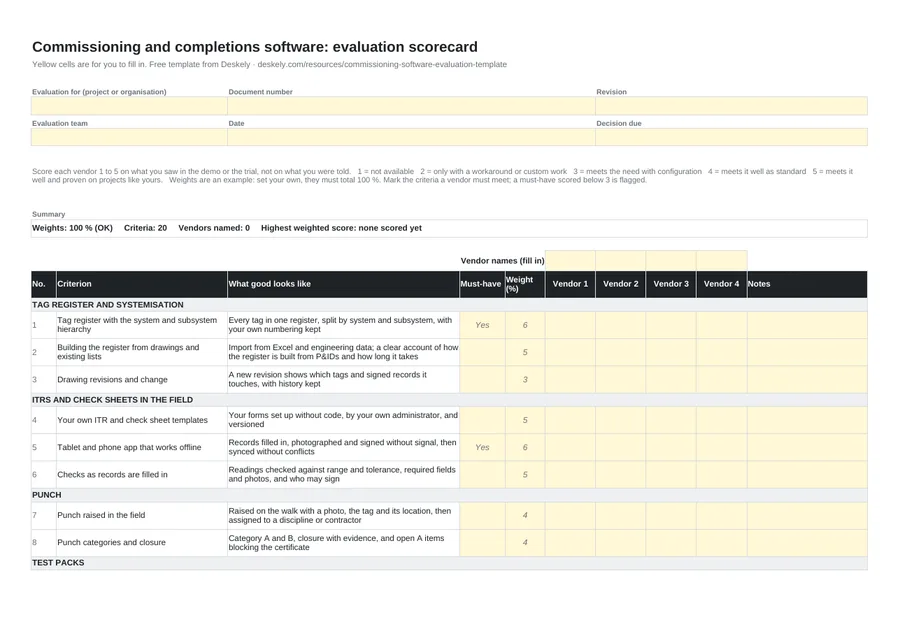
| Sheet | Fields |
|---|---|
| Scorecard | Evaluation for, document number, revision, team, date, decision due; vendor names (blank); 20 criteria in 12 groups with what good looks like, must-have (Yes, No), weight (%) and a 1 to 5 score per vendor; weights total check; criteria scored, weighted score out of 5 and in %, must-haves scored below 3, and rank per vendor; a summary line naming the highest weighted score; sign-off |
| Demo questions | 23 questions by area (register, ITRs, punch, test packs, certificates, dossier, reporting, integrations, access, security, implementation, pricing, references, product) with what a good answer shows and a notes column per vendor, headed with the vendor names from the scorecard |
Where to go next
For the tools on the market, see the best commissioning software, which describes 15 completions, building commissioning and construction tools from their public material. For buildings and data centres, compare Facility Grid and CxAlloy. For what a completions system does, see commissioning software and completions software.
We make Deskely, one of the completions systems you may be evaluating. If it is on your list, we will run a demo against this scorecard on your own drawings.
The Deskely products for this
Frequently asked questions
How do you evaluate commissioning software?
Agree weighted criteria and must-haves first, run a scripted demo on your own data with every vendor, score what you saw from 1 to 5, then check the leader with a short trial and reference calls.
What criteria matter most for completions software?
The tag register and how it is built, field records on tablets that work offline, punch, certificates checked against open records, handover, integrations and references on projects like yours.
How many vendors should be on a shortlist?
Usually three or four for scripted demos, and one or two for a trial or proof on your own system.
Should the scoring be weighted?
Yes. Weights make the team agree what matters before seeing the vendors. Keep must-haves separate, so a high total cannot hide a missing must-have.
What should I ask in a commissioning software demo?
Ask to see work done, not slides: build the register for one system, fill in an ITR offline, try to sign a certificate with an open item, and trace a drawing revision to signed records.
- In production since 2014
- Thousands of daily users
- On MODEC FPSO projects since 2016