Drawing register template: free document register with status and return codes (Excel and PDF)
Deskely Completions team Singapore
A drawing register (or document register) is the controlled list of every drawing and document on a project, with its number, title, discipline, current revision, status, client return code and the transmittal it was issued on, so that everyone on the project knows which revision is current and which have been superseded.
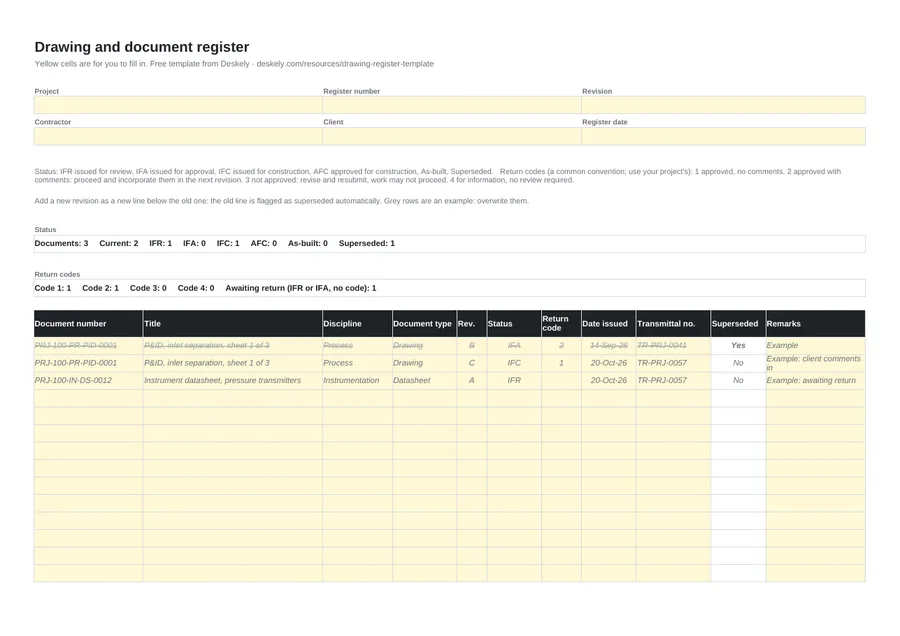
This page gives you a free drawing register in Excel and PDF, with status and return code drop-downs, a superseded flag that sets itself when a later revision is added, and counts by status at the top. The same workbook holds a document transmittal.
- One line per revision: a new revision goes below the old one, and the old one is marked superseded.
- Status says why a document was issued; the return code says what the reviewer decided.
- Only IFC or AFC revisions belong at the work front.
- Every issue is traceable to a transmittal number.
Document status codes
| Status | Meaning | Can it be built from? |
|---|---|---|
| IFR | Issued for review: shared for comment, not yet for approval | No |
| IFA | Issued for approval: submitted for the client's formal approval | No |
| IFC | Issued for construction: released by engineering for the work | Yes |
| AFC | Approved for construction: approved by the client for the work | Yes |
| As-built | Updated to show what was actually built, from the site red-lines | Record only |
| Superseded | Replaced by a later revision | No |
Projects use variants of these (IFD for design, IFI for information, IFP for purchase). Use your project's list; the drop-down is easy to change.
Return codes
| Code | Meaning (a common convention) | What happens next |
|---|---|---|
| 1 | Approved, no comments | Proceed; issue the next status when ready |
| 2 | Approved with comments | Proceed, and incorporate the comments in the next revision |
| 3 | Not approved | Revise and resubmit; work may not proceed |
| 4 | For information only | No review required |
The meaning of each code is set in the contract or the document control procedure, and some projects use letters instead of numbers. Check yours before filling in the column.
Revisions and the superseded flag
Most projects use letters for revisions before approval (A, B, C) and numbers from the first construction issue (0, 1, 2). Each revision goes on its own line in the register. The template flags every earlier line of the same document number as superseded automatically, greys it out and leaves it out of the current counts.
Drawing changes after IFC are where most completions problems start: a tag added, a line rerouted, a valve changed. See management of change and how to read a P&ID.
What is in the template
| Sheet | Fields |
|---|---|
| Register | Project, register number, revision, contractor, client, register date. Counts of documents, current documents and each status, and of each return code with documents awaiting return. Table: document number, title, discipline (drop-down), document type (drop-down), revision, status (IFR, IFA, IFC, AFC, As-built, Superseded), return code 1 to 4, date issued, transmittal number, superseded (formula), remarks. |
| Transmittal | Transmittal number, project, date, from, to, attention, purpose of issue (drop-down), review period and response due date (formula), the documents sent with revision, copies and format, remarks, and an acknowledgement block. |
From the register to the tag
The register controls the documents. Completions works from the tags on them: every tag on an IFC P&ID belongs in the tag register, and each new revision can add, remove or change tags that already have records signed against them. See the equipment list template for the tag side.
Deskely Delta shows what changed between revisions and everything it touches.
The Deskely products for this
Frequently asked questions
What is a drawing register?
A controlled list of every drawing and document on a project with its number, title, discipline, current revision, status, return code and the transmittal it was issued on.
What does IFC mean on a drawing?
Issued for construction: the revision released for the work. Only IFC or AFC revisions should be used at the work front.
What are document return codes?
The reviewer's decision on a submitted document. A common convention is 1 approved, 2 approved with comments, 3 not approved (revise and resubmit), 4 for information.
What is the difference between IFC and AFC?
IFC means engineering has released the document for construction; AFC means the client has approved it for construction. Projects use one or both.
How do I track superseded drawings?
Add each new revision as a new line. The template marks every earlier line of the same document number as superseded and leaves it out of the current counts.
- In production since 2014
- Thousands of daily users
- On MODEC FPSO projects since 2016