Management of change (MOC) form: free request, approval and register template (Excel and PDF)
Deskely Completions team Singapore
A management of change (MOC) form is the record that a change to a plant, its equipment, its procedures or its people was described, reviewed for hazards, approved by the right people, reflected in the drawings and procedures, and closed out, before and after the change was put into use. It is the paper trail of process safety management.
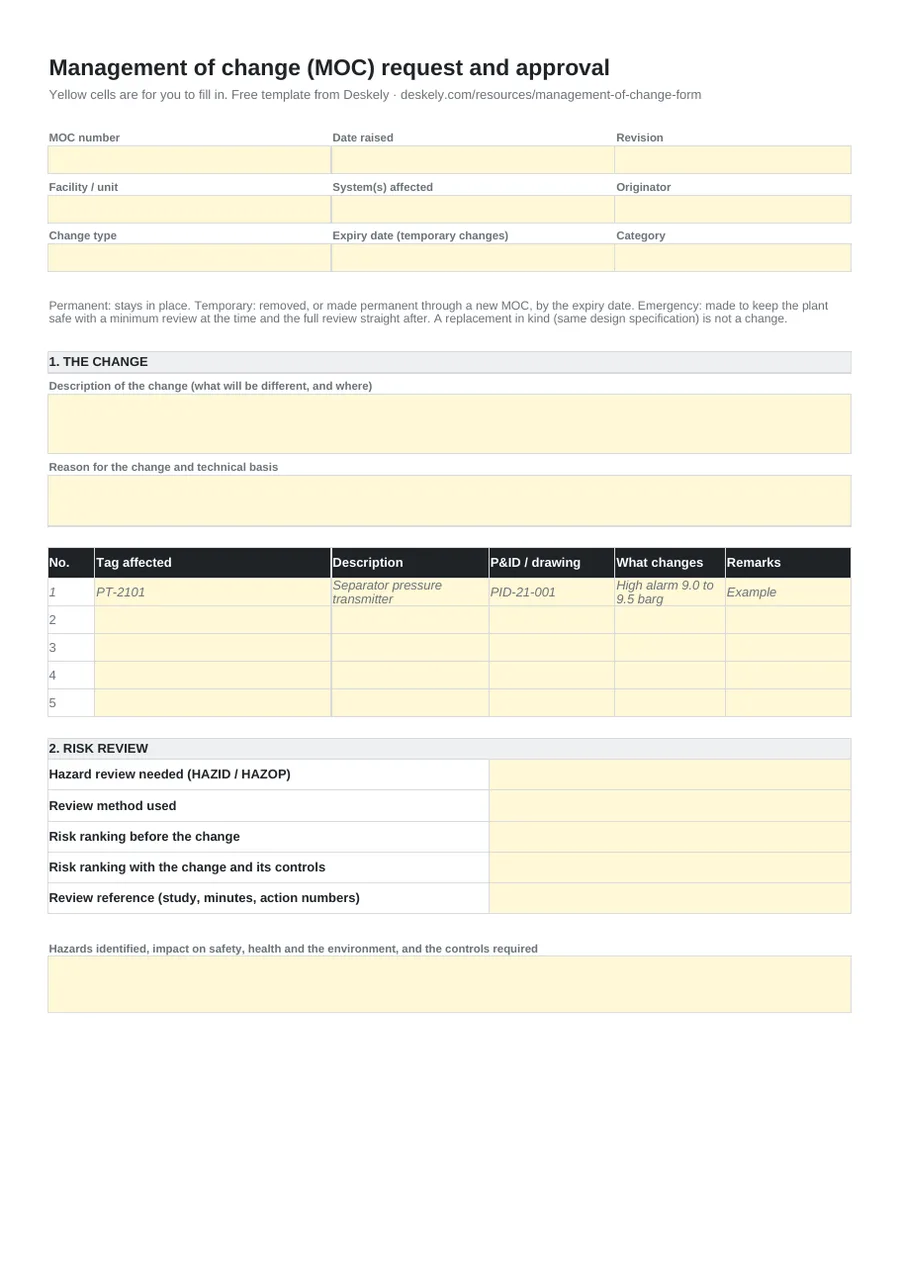
This page gives you a free MOC form in Excel and PDF: the request with permanent, temporary and emergency types, the risk review, a checklist of documents to update, training and PSSR, five approval signatures and the close-out. A second sheet is the MOC register, with days open and a flag on every temporary change past its expiry date.
- Every change that is not a replacement in kind needs an MOC: equipment, chemicals, set points, procedures, organisation.
- A temporary change carries an expiry date and is tracked until it is removed or made permanent.
- The MOC is not closed until the P&IDs, procedures, alarm settings and training match the change.
- Significant changes get a pre-startup safety review before they go into service.
What the MOC form has to cover
In the US, OSHA's process safety management standard, 29 CFR 1910.119 paragraph (l), requires written MOC procedures for changes to process chemicals, technology, equipment, procedures and facilities. The procedures must address the technical basis for the change, its impact on safety and health, changes to operating procedures, the time period of the change and who authorises it. People affected must be informed and trained before start-up, and the process safety information must be updated. Similar duties sit in the EU Seveso III directive and the UK COMAH regulations.
A good form turns those duties into fields, so nothing depends on memory:
| Section | What it records | Why |
|---|---|---|
| The change | Description, reason and technical basis, tags and drawings affected | The technical basis, and what exactly is different |
| Type | Permanent, temporary (with expiry date) or emergency; minor or major | Sets the depth of review and the time period |
| Risk review | Whether a HAZID or HAZOP is needed, the method used, risk ranking before and after | The impact on safety and health |
| Documents to update | P&IDs, cause and effect charts, procedures, datasheets, alarm and trip list, relief and flare data, training material | Process safety information kept true |
| Training and PSSR | Who is trained and how; whether a pre-startup safety review is needed | People informed and trained before start-up |
| Approval | Originator, area authority, technical authority, HSE, operations | Authorisation at the right level |
| Close-out | Implementation dates, documents issued, temporary change removed, verification | Proof the change was finished, not just approved |
Permanent, temporary and emergency changes
| Type | Meaning | What the form asks for |
|---|---|---|
| Permanent | The change stays in place | Full review and approval before implementation |
| Temporary | In place for a set period: a clamp, a bypass, a temporary hose, a changed set point for a trial | An expiry date (the form flags it if missing) and a removal plan; at expiry it comes out or goes through a new MOC to become permanent |
| Emergency | Made to keep the plant safe when there is no time for the full review | A minimum review at the time, the full review straight after |
Temporary changes are where MOC systems most often fail: a clamp fitted for three months and still there years later, never reviewed as permanent. The register sheet flags every open temporary change that is past its expiry date, expires within 14 days or has no expiry date at all.
What is in the template
| Sheet | Fields |
|---|---|
| MOC request | MOC number, date, revision, facility, systems affected, originator; change type (Permanent, Temporary, Emergency) with expiry date and a warning if a temporary change has none; category (Minor, Major); description; reason and technical basis; tags affected with drawing and what changes (one worked example row) |
| MOC request (risk review) | HAZID or HAZOP needed (Yes, No), review method, risk ranking before and with the change, review reference, hazards and controls |
| MOC request (documents) | Ten document types with update needed, new revision, owner and date done, and a live count of updates needed, done and still to do |
| MOC request (approval and close-out) | Training needed, PSSR required and reference; approval by originator, area authority, technical authority, HSE and operations with a decision drop-down; conditions; implementation, removal, document issue, training and closure dates; close-out verification and signatures |
| MOC register | One line per change: number, title, unit, type, category, originator, raised, expiry, approved, implemented, closed, status (Open, Approved, Implemented, Closed, Rejected), days open, temporary change flag, PSSR; counts by status and of temporary changes past expiry |
Where MOC fits in the project and plant flow
On an operating plant, the MOC form is the gate for any change to a process covered by process safety management. When the change is significant enough to alter the process safety information, a pre-startup safety review checks that construction, procedures, training and hazard review actions are complete before it is used.
On a capital project the same idea runs through technical queries, field change requests and drawing revisions. Each revision can touch tags that already have signed inspection records, punch items, test packs or procedures against them, and those have to be found before anyone signs against the old drawing. The management of change guide covers the process step by step; see also how to read a P&ID and the cause and effect matrix, two of the documents most often updated by an MOC.
Tracing drawing changes in Deskely
Deskely Delta compares two revisions of a drawing tag by tag and traces every change to the ITRs, punch items and procedures it touches, before anyone signs against the old revision.
The Deskely products for this
Frequently asked questions
What is a management of change form?
The record of one change: what it is and why, the hazard review, the documents and training it affects, who approved it, and how it was implemented and closed out.
Who approves a management of change?
It depends on the procedure and the risk. Typically the area authority and a technical authority for the discipline, with HSE and operations for larger changes. The form has space for five approvers.
What is a temporary MOC?
A change approved for a limited time, with an expiry date. By that date it is removed, or it goes through the full MOC process to become permanent.
Does a replacement in kind need an MOC?
No. A replacement that meets the design specification of the item it replaces is not a change. Deciding what counts as in kind is part of the MOC procedure.
Which OSHA paragraph covers management of change?
OSHA 29 CFR 1910.119, paragraph (l). Pre-startup safety review is paragraph (i).
- In production since 2014
- Thousands of daily users
- On MODEC FPSO projects since 2016